
Okay, can we talk about the fact that Amazon has had a built-in AI shopping assistant for a while now and somehow most moms I know have never heard of it?
It’s called Rufus, and it lives right inside the Amazon app and on Amazon’s website. No extra download, no subscription, no setup. It’s completely free and available to every Amazon shopper right now — and once you start using it, you’ll wonder how you ever survived a shopping session without it.
As a busy mom, the part of Amazon shopping that eats the most time isn’t the checkout. It’s the decision-making. Scrolling through 300 results, reading reviews for 20 minutes, watching YouTube comparison videos, texting your friend who bought the same thing last year — all of that adds up. Rufus basically skips all of that. Here’s everything you need to know.
What Is Amazon Rufus?
Rufus is Amazon’s generative AI-powered shopping assistant. Think of it like having a really knowledgeable friend who has read every product listing, every customer review, and every Q&A on Amazon — and is available to chat with you any time you’re shopping.
You can ask Rufus actual questions in plain, everyday language and it will give you real, conversational answers. Not just a list of search results — actual guidance, comparisons, and recommendations based on what you’re looking for.
According to Amazon, Rufus is trained on Amazon’s full product catalog, customer reviews, community Q&A posts, and information from across the web. So when you ask it something, it’s not just guessing — it’s pulling from an enormous amount of real shopping data to give you a useful answer.
The name, by the way, comes from a Welsh corgi named Rufus who used to roam Amazon’s first warehouse back in 1996. That detail lives rent-free in my head now and I think it makes this whole thing more charming.
How to Find Rufus on Your Amazon App
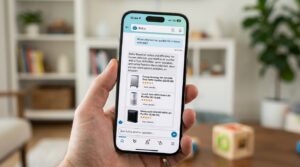
This is where most people get stuck — they’ve never noticed it because it’s tucked into the app navigation rather than front and center. Here’s exactly where to find it:
On the Amazon Shopping app (mobile)
- Make sure your Amazon Shopping app is up to date — go to your app store and check for updates first.
- Open the app and look at the bottom navigation bar.
- Tap the Rufus icon — it looks like two chat bubbles with a small sparkle.
- A chat window will pop up from the bottom of your screen.
- Type or speak your question and Rufus will respond.
- When you’re done, swipe down on the chat window or tap the X to go back to regular browsing.
On Amazon.com desktop
- Go to Amazon.com and look at the top left side of the navigation bar.
- Click the Rufus button and a chat window will open in the bottom left corner of the page.
- Ask your question or choose from the suggested prompts.
- Click the X or minimize button when you’re finished.
One thing worth knowing: Rufus and the regular search bar work together, not instead of each other. You can still search normally — Rufus is just an additional layer of help on top of that.
The Best Ways Moms Can Use Rufus
This is where it gets genuinely useful. Here are the ways Rufus saves the most time for busy moms specifically.
Getting honest product comparisons in seconds
Instead of opening five tabs and cross-referencing specs, just ask Rufus directly. Examples that actually work well:
- “What is the difference between the Ninja and Vitamix blenders?”
- “Compare the Hatch Rest and the LectroFan white noise machine for a newborn.”
- “What’s better for a 3-year-old — a balance bike or a tricycle?”
Rufus will break down the key differences in plain language and often point you toward the option that fits your specific situation. No more spending 45 minutes reading reviews to reach the same conclusion.
Finding the right product when you don’t know exactly what you need
This is honestly Rufus’s superpower for moms. You can describe your problem and let it figure out the product category for you. Try things like:
- “I need something to organize my fridge that works for a family of four.”
- “My 7-year-old keeps losing his water bottle. What’s the most durable kids’ water bottle on Amazon?”
- “I want a gift for a new mom under $40 that she’ll actually use.”
This is so much faster than trying to figure out what search terms to even use. You talk to Rufus like a person and it works like one.
Checking your own order history hands-free
You can ask Rufus things like “When is my order arriving?” or “When did I last order laundry detergent?” and it will pull up the information directly from your account. For moms who are Subscribe & Save users — we have a full breakdown of how Amazon Subscribe & Save works if you haven’t tried it yet — this is a great way to quickly check what’s scheduled to arrive and when.
Shopping for the right thing at the right time of year
Rufus knows what’s trending and in season. Ask it “What are the best back-to-school backpacks for middle schoolers right now?” or “What outdoor toys are popular for kids this summer?” and it will factor in current trends and availability rather than just surfacing older listings.
Getting unbiased pros and cons before buying
Before you commit to a bigger purchase — a robot vacuum, a car seat, a standing desk — ask Rufus: “What do people not like about the [product name]?” It will pull from real customer reviews to give you the honest downsides, not just the sales pitch from the product listing. This alone has saved me from some bad buys.
Rufus vs. Regular Amazon Search
So how is this actually different from just typing something into the regular Amazon search bar? Great question — and the difference is bigger than you’d expect.
Regular Amazon search
You type keywords, and Amazon shows you a ranked list of products. It’s fast and works well when you know exactly what you want. But it doesn’t understand context, can’t answer questions, and requires you to do all the comparison and decision-making yourself. The more vague your need, the less useful it is.
Rufus
You ask a question in natural language. Rufus understands what you actually mean, not just the words you typed. It can follow up, handle nuance, pull in context from reviews and your own order history, and give you a recommendation with reasoning behind it — not just a ranked list.
The sweet spot: use Rufus for research and decisions, use the search bar for quick reorders of things you already know you want. Together they make for a genuinely efficient shopping experience — which, for a mom who is trying to get in and out of Amazon without falling into a rabbit hole, is kind of everything.
If you want to take your Amazon efficiency even further, our post on Alexa+ for busy moms covers how Amazon’s voice AI can handle a whole other layer of your household to-do list — the two tools complement each other really well.
A Few Things Rufus Can’t Do (Yet)

To be fair, Rufus is still improving and it has its limits. A few things to keep in mind:
- It’s not always perfect. Amazon says upfront that Rufus may not always get things right. If something seems off, double-check the product listing yourself before buying.
- It’s designed for shopping, not advice. Don’t ask it for medical, legal, or financial guidance. It’s a shopping assistant, not a doctor or a lawyer.
- It doesn’t know everything in real time. Very recent events or niche topics might not be fully reflected in its answers. For things like current Prime Day deals, it’s worth browsing the deals page directly too.
- Avoid sharing personal info. Amazon specifically asks that you don’t share sensitive personal information in Rufus chats.
None of these are dealbreakers — they’re just things to be aware of so you get the most out of it.
The Bottom Line on Rufus
Amazon Rufus is one of those features that doesn’t get nearly enough attention, especially among moms who spend a significant chunk of their lives shopping on Amazon and could genuinely use the help. It’s free, it’s already in your app, and it can save you real time on the decisions that usually eat up your shopping sessions.
My honest take? Start small. Next time you’re trying to decide between two products, instead of spending 20 minutes reading reviews, just open Rufus and ask. Once you get comfortable with that, you’ll naturally start using it for more — and before long, shopping on Amazon will feel a lot less like a part-time job.
If you’re looking for more ways to shop smarter on Amazon without spending more money, our post on how moms can save hundreds on Amazon is a great next read. And if you haven’t already set up Subscribe & Save for your household essentials, here’s where to start — Rufus can even help you figure out which items are worth subscribing to.