
That giant discount badge is doing a lot of work. You came to Amazon for replacement lunch containers, and now a coffee maker is whispering that it is practically free. Before your cart develops a personality of its own, try one small check: look at the item’s Amazon price history.
This feature gives the current price some context. Instead of judging a deal only by the crossed-out number, you can see how the product’s price has moved over time. For busy moms juggling gifts, household basics, and an actual budget, that is a useful pause button.
What Amazon price history actually shows
According to Amazon’s official price-history guide, shoppers can review 30-, 90-, and 365-day views on eligible product pages. The guide was updated in November 2026 and specifically highlights holiday shopping. Rather than opening another app first, you can check the available history while researching the item on Amazon.
Think recent context, not a crystal ball
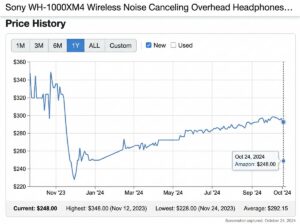
The chart helps answer a practical question: is today’s price lower than the prices shown recently? It cannot tell you what Black Friday will bring, whether a seller will restock, or when your favorite color will be discounted. A recent low is helpful information, not a promise about tomorrow.
Imagine a toy showing a sale price of $45 beside a much higher reference price. If its history repeatedly shows prices around $45, the discount may feel less urgent. If the same item usually appears at a higher price in the chart, the offer deserves a closer look. These are hypothetical examples, not current deals.

How to check Amazon price history
Start with the exact item you want, not a search-results screenshot. Choose the color, size, model, and pack count before checking the history. Those details matter because two versions that look similar can be very different purchases.
Look beside the price or ask Alexa for Shopping
- Open the product detail page in Amazon’s app or website.
- Look for a Price History link near the price, where available.
- Review the available time ranges to compare recent pricing with a longer view.
- Alternatively, open Alexa for Shopping on the product page and ask, “What’s the price history?” or “Has this item been on sale in the past 30 days?”
Use the 30-day view for a quick check of recent movement. The 90-day view can help you see whether a lower price has appeared more than once. The 365-day view adds a longer comparison, including earlier shopping periods. These are useful ways to read the available ranges, not predictions. A single brief dip does not mean you will be able to buy at that price again.
The shopping assistant formerly called Rufus is now Alexa for Shopping. That is the name to look for in current instructions. You do not need to buy an Echo device just to use the assistant in Amazon’s store.
If you cannot find the chart
Check that your app is updated and that you are viewing a supported marketplace. Amazon currently lists availability in the U.S., UK, Canada, India, Japan, Germany, France, Italy, and Spain, but its guide refers to eligible product pages. Do not assume every listing will display every view. If history is unavailable, compare the live price elsewhere and use your planned budget instead of guessing.
Read the chart without missing the fine print
Here is the detail that makes this tutorial more useful than “just check the graph.” Amazon’s official Alexa for Shopping FAQ says price-history graphs show the lowest Featured Offer price for each day or week, including any shipping fees added by sellers. The Featured Offer is the offer beside the Add to cart or Buy Now buttons.
Know what the graph cannot settle
Amazon also says the graphs are for reference and may not capture every price change. That means the chart is not a complete comparison of every seller or every deal you personally qualify for. Treat it as one useful check, then confirm the offer actually available to you.
Look separately at coupons, membership offers, shipping, taxes, and the checkout total. Check whether you are buying new, used, or refurbished stock. A different condition, seller, or bundle can change the value even when the headline price looks better.
Compare the same product, not just the same photo
Before buying a kitchen appliance, verify the model and included accessories. For household supplies, compare the count and unit price. An oversized pack is only useful if you will use it and have somewhere to store it. Mommazon’s guide to saving on Amazon without sacrificing quality offers related budgeting ideas, but the live listing and checkout should decide today’s purchase.
Use price history for calmer holiday shopping
Start with people and needs, then look for prices. A gift that suits the child or relative is worth researching. Something nobody requested does not become thoughtful just because it is discounted.
Save a small shortlist and a target price
Use Amazon Lists to save gift ideas in one place and revisit saved items for deals or price drops. Keep a note of your spending limit and when the gift is needed. The historical low can inform that limit, but it should not replace your household budget.

For kids’ presents, use Mommazon’s 2026 Amazon toy guide to narrow ideas by play style and occasion before comparing prices. Then review the product’s age guidance and warnings. A great price is not a substitute for choosing an appropriate toy.
Give everyday purchases the same attention
Price history is not only for big holiday gifts. It can help when you are comparing a replacement vacuum or pantry basics. If an item is also available through recurring delivery, compare today’s one-time total with the current subscription offer rather than assuming either is cheaper.
Mommazon’s Subscribe and Save guide is useful related reading. Always review the actual delivery schedule, current price, and offer terms before subscribing. A lower total loses its appeal if more supplies arrive than your family needs.
Make the final decision about value
Buy when the item meets a real need, the exact version fits your budget, and the delivery and return terms work for you. Wait when it is optional or you still need to compare. Skip when the sale badge is the only reason it landed in your cart.
There is no prize for finding the lowest number on every chart. Amazon price history simply gives you better context before spending. Check the history, verify the final total, and choose what makes sense for your family. The best deal is one you can feel good about after the countdown disappears.